Static pages with Pizzazz
There are some pages where you want them to be server rendered for SEO but also have interactivity. You have two choices:
- Server render them and add interactivity through JS scripts. See content.js for an example. This script makes the dark-mode toggler work and also adds interactivity to blog Table of Contents and even to this documentation page ;). This method is pretty straighforward. If you are having trouble doing it, feel free to ask AI.
- The second and more interesting way of doing it is to server render your page and then re-render it on frontend using the same code but now supporting interactivity.
The Landing page
The src/cljc/saas/ui/pages/landing.cljc is a great example for this. We describe the hiccup in a .cljc file that can be as easily rendered to string but then render again using src/cljs/saas/landing.cljs which simply imports the cljc file, defines the dispatch action system and re-renders, but because now we are already in the browser, interactivity such as the dynamism of the top bar now appears.
In React, this is called hydration. It's the same concept:
- Render something to string on the backend and serve it as static html but include a script including react
- Once it hits the client, render again under the same dom node and add interactivity.
From the user's perspective, nothing happened, but under the hood, now you can add state, fancy animations and much more!
Shadow CLJS bundling
ShipClojure is made to be a profesional SaaS starter so the final generated JS for the clientside app is pretty big. This doesn't matter that much for the actual SaaS part as people don't mind to download 1MB of JS in their SaaS, but for a landing page it matters. Both users feel slow static pages but also search engine indexers will downrank your pages if they have a low lighthouse score. Therefore we need to control how much JS we serve on static pages.
I wrote a blog post about how to do this with UIX and the same concept applies for Replicant in terms of shadow-cljs:
- You put common cljc/cljs code in common module,
:basein our case - You separate the entry for a static page and that for the main Saas (
:landingvs:main). The shadow-cljs config will look like this:shadow-cljs.edn {:builds {:app {:target :browser :modules {;; base module containing common code :base {:entries [saas.base-nexus]} ;; landing specific rendering :landing {:init-fn saas.landing/init! :depends-on #{:base}} ;; main entry used for the main Single Page App :main {:init-fn saas.core/init! :depends-on #{:base}}}}}
This will generate 3 final js files: base.js, landing.js and main.js.
For the landing page you need to import in the html file base & landing because landing depends on base. For the single page app part of the system, you need to import base and main because main also depends on base.
You can see these layouts already handled for you in layout/core.cljc particularly spa & landing:
(defn render-scripts [scripts]
  (for [s scripts]
            [:script {:src (let [script-path (str "/assets/js/" (name s) ".js")]
                             (path->asset script-path))}]))

(defn spa
  [{:keys [path->asset] :or {path->asset identity} :as opts} & children]
  (base opts
        [:div#app
         children]
        (when-let [scripts (:page/scripts opts [:base :main])]
          (render-scripts scrips)))

(defn landing
  [{:keys [path->asset] :or {path->asset identity} :as opts} & children]
  (base opts
        [:div#app
         children]
        (when-let [scripts (:page/scripts opts [:base :landing])]
          (render-scripts scrips))))
Checking bundle sizes
You need to inspect that the final JS is within limits. Luckily shadow-cljs supports this and there is a bb command to generate the report:
bb run build:frontend:report
Once this finishes and you have the local server running, you can visit http://localhost:8080/report/ and see your bundle split. It should look like this:
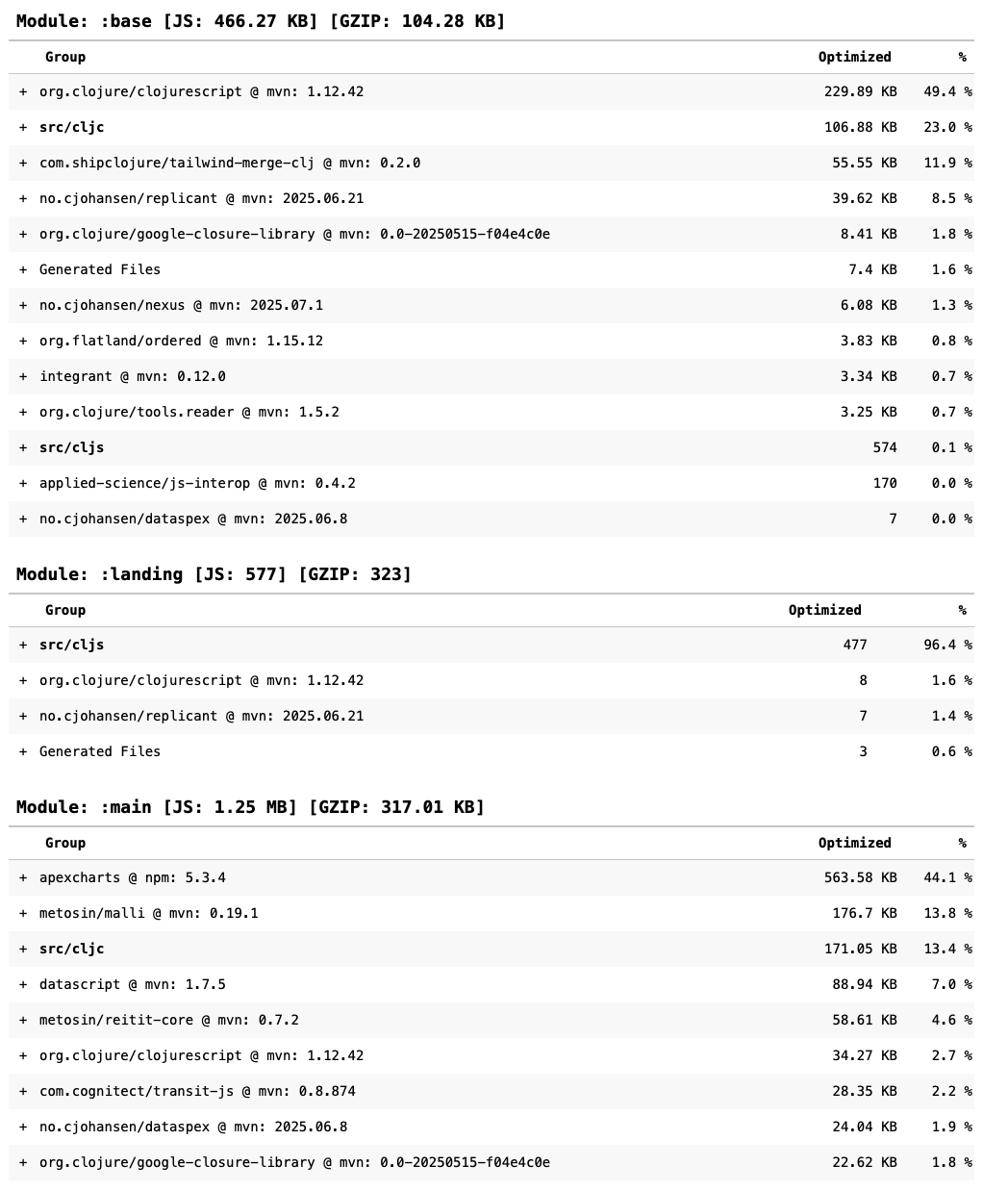 Bundle report for current shipclojure datom
Please note that the GZIP part is more important than the normal one as we only care how much JS we deliver not how much is ran in the browser. Shipclojure Datom comes with GZIP middleware so all assets are zipped before served.